

Video now drives the majority of ad impressions across Meta’s platforms. People scroll straight past static images, but a good video stops the thumb. The problem used to be cost. Producing a decent ad meant a videographer, an editor, and a two-week turnaround.
- Hook viewers in about three seconds; optimize scenes to raise three-second play rate above acceptable benchmarks.
- Design for sound off and burn accurate, styled captions into the video instead of relying on auto captions.
- Export correct aspect ratios, build vertical first, use 9:16 for Reels and Stories and 4:5 for mobile Feed to avoid letterboxing.
- Choose tools that match your bottleneck—speed, brand control, repurposing, or volume; watch pricing, watermarks, and workflow features.
That barrier is gone. Today you can go from a product URL to a placement-ready video ad in minutes. The question is no longer whether to use a tool. It is which tool fits how you actually work. This guide compares the best options and covers the specs and creative rules that decide whether your ad performs.
What Makes a Facebook Video Ad Engaging?
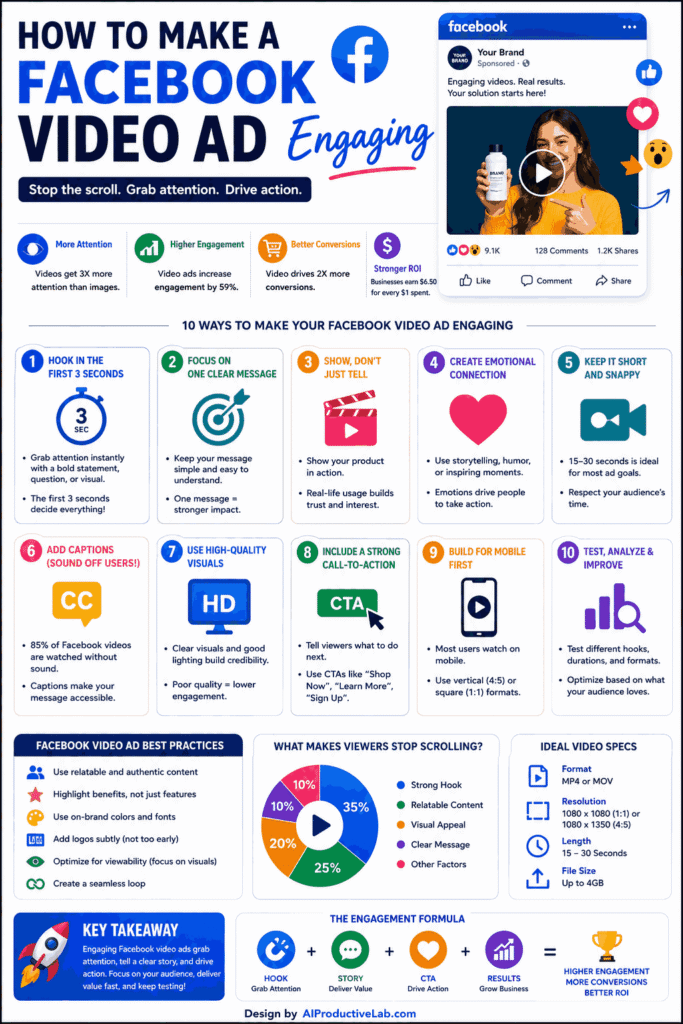
Before choosing software, understand what the platform rewards. Three things matter most.
The hook. You have roughly three seconds before someone scrolls. Hook rate, meaning three-second plays divided by impressions, is the metric to watch. Above 25% is acceptable. Over 30% is strong.
Sound-off design. Most Facebook videos are watched with the sound off. Burn captions into the video file rather than relying on auto-generated ones, which are less accurate and depend on viewer settings.
Correct aspect ratio. Wrong ratios cause letterboxing, which lowers completion rates and raises your effective cost per thousand impressions. Build vertical first, then resize down.
Facebook Video Ad Specs Cheat Sheet
| Placement | Aspect Ratio | Recommended Length |
|---|---|---|
| Feed (mobile) | 4:5 (1080 x 1350) | 15–30 seconds |
| Reels | 9:16 (1080 x 1920) | Under 30 seconds |
| Stories | 9:16 (1080 x 1920) | 6–10 seconds |
| In-stream | 16:9 or 1:1 | 6–15 seconds |
| Marketplace | 1:1 (1080 x 1080) | 15–30 seconds |
Two ratios cover most of your inventory: 9:16 for Reels and Stories, 4:5 for Feed. Use MP4 with H.264 video and AAC audio, at 1080p minimum. Always check Meta’s current Ads Guide, since specs change.
What to Look for in a Facebook Video Ad Maker
Not every tool solves the same problem. Compare on these points.
- Starting point: Does it build from a product URL, a script, a blog post, or existing footage?
- Format handling: Can it export 9:16, 4:5, and 1:1 versions without you rebuilding each one?
- Caption quality: Are subtitles burned in, styled, and accurate?
- Brand control: Can you lock fonts, colors, and logos so output stays consistent?
- Workflow depth: Does it stop at export, or launch campaigns to Meta directly?
- Pricing model: Watch for watermarks on free tiers and per-seat costs as your team grows.
Best Online Tools for Creating Facebook Video Ads
1. InVideo AI — Best for Fast Text-to-Video Ads
InVideo turns a prompt into a finished ad with stock footage, voiceover, and captions. You select your audience, platform, and style, then refine using plain-language edit commands like “shorten scene two” or “change the voiceover accent.” Hundreds of ad templates are pre-sized for social placements. Best for marketers who want speed and have no footage to start from.
2. Canva — Best for Design Control
Canva remains the most approachable option for teams that want to stay in charge of the visuals. Magic Resize reformats one design into every Facebook ad size in a click. Real-time collaboration, comments, and approval workflows make it practical for small teams. Pro sits around $12.99 per month for individuals, with team plans near $14.99 per user. Best when brand consistency matters more than automation.
3. FlexClip — Best Budget Pick
FlexClip punches above its price point. The free tier is more capable than most competitors at the same level, and paid plans sit well below the industry average while still including AI text-to-video, auto-subtitles, and a solid stock library. Ad-specific templates cover common Facebook placements. Best for solo marketers and small businesses working with limited budgets.
4. CapCut — Best Free Editor for Native-Feeling Ads
CapCut is free, browser and mobile friendly, and built around the short-form editing style people already expect in Reels. Trending audio, fast captioning, and quick cuts help ads feel native rather than obviously produced. It has no Meta integration, so you export and upload manually. Best for creators who want ads that look organic.
5. Pictory — Best for Repurposing Existing Content
Pictory turns text, URLs, scripts, or slide decks into video with automatically selected visuals and audio. It also clips longer videos into short ad cuts. The editor lets you swap in custom images or generate new ones from prompts. Best for content marketers and brands sitting on written or long-form assets they want to convert into ads.
6. HeyGen — Best for UGC-Style Avatar Ads
Testimonial and spokesperson formats consistently perform on Meta, but filming them is slow. HeyGen generates realistic AI avatars that deliver your script, with multilingual voice options for international campaigns. You get UGC-style creative without a camera or a shoot day. Best for advertisers who need to test many script variations quickly.
7. Predis.ai — Best for Organic and Paid Together
Predis generates ad creatives and captions in one pass, then schedules them alongside your organic content. That unified workflow suits social media managers who own both sides. Best for small teams where the same person handles the content calendar and the ad account.
8. AdCreative.ai — Best for Predictive Scoring
AdCreative.ai generates creatives and scores them for likely performance before you spend anything. Its strongest work is on static formats, so treat it as a companion for testing concepts rather than a full video suite. Best for performance marketers who want data before launch.
9. Veed.io — Best for Captions and Polish
Veed is a browser-based editor with strong automatic subtitling, cleanup tools, and quick resizing. It works well as the finishing step after another tool generates your rough cut. Best for teams that already have footage and need it made ad-ready.
10. Full-Stack Meta Platforms — Best for Launch and Optimization
A newer category of tools generates creative and then launches it straight to your Meta ad account, mixing headlines, audiences, and creatives into many variations automatically. Platforms in this space, including AdStellar and similar entrants, aim to cover the whole workflow in one interface. Best for performance marketers running high creative volume who want fewer platform switches.
Comparison Table
| Tool | Best For | Meta Launch |
|---|---|---|
| InVideo AI | Prompt-to-video speed | No |
| Canva | Design and brand control | No |
| FlexClip | Tight budgets | No |
| CapCut | Native-feeling short form | No |
| Pictory | Repurposing content | No |
| HeyGen | UGC avatar ads | No |
| Predis.ai | Organic plus paid | Partial |
| AdCreative.ai | Pre-launch scoring | Partial |
| Veed.io | Captions and finishing | No |
| Full-stack platforms | End-to-end campaigns | Yes |
So What Is the Best Online Tool?
There is no universal winner, but the choice narrows quickly.
- Starting from nothing: InVideo AI or FlexClip get you to a finished ad fastest.
- Protecting brand consistency: Canva gives the most control without a designer.
- Repurposing blogs or webinars: Pictory does this better than anything else.
- Testing many angles cheaply: HeyGen lets you generate dozens of script variations.
- Running serious ad spend: A full-stack platform pays for itself once creative volume becomes the bottleneck.
For most small businesses, the honest answer is Canva or FlexClip plus a caption pass. For performance teams spending real money, generation speed matters more than polish, and an AI-first tool wins.
Mistakes That Quietly Waste Ad Spend
- Shipping the default 1:1 ratio for Feed. Ads Manager defaults to square, but 4:5 gives more screen space and usually better click-through rates on mobile.
- Starting horizontal and cropping down. Build vertical first. Cropping a 16:9 video into 9:16 loses your framing.
- Ignoring safe zones. Stories interfaces cover the top and bottom of the screen. Text placed there is invisible.
- Making one version of everything. The same product in three ratios gives you three distinct assets and more chances in the auction.
- Running long by default. Direct response performs best around 10 to 15 seconds. Length is not depth.
Final Thoughts
The best online tool for creating engaging Facebook video ads is the one that removes your specific bottleneck. If ideas are your constraint, use an AI generator. If consistency is the issue, use a template system. If volume is the issue, use a platform that launches for you.
Whatever you pick, the creative fundamentals do not change. Hook in three seconds, design for sound-off, and export the right ratio for the placement. Get those right and almost any tool on this list will produce ads that work.
FAQs
CapCut and FlexClip both offer capable free tiers, though FlexClip removes watermarks only on paid plans.
Aim for 15 to 30 seconds in Feed, under 30 for Reels, and 6 to 10 seconds for Stories.
Use 9:16 for Reels and Stories and 4:5 for mobile Feed. These cover most Meta inventory.
Yes. Most viewers watch without sound, so burn accurate captions directly into the video file.
Yes. Tools like InVideo and HeyGen build complete ads from a prompt, script, or product URL in minutes.


 AI/ML Strategy and Consulting
 Data Science And Data Analytics
 Generative AI
 AI Consulting Services
 AI Automation Solutions
 API Integration