

Building reports by hand is one of the biggest time sinks in modern business. You pull data from five platforms, paste it into slides, then write the same summary you wrote last month. An AI report generator removes most of that work. It reads your data, drafts the narrative, and formats the output for you.
- AI report generators synthesize raw inputs, draft narratives, and surface the "so what" insights that explain why numbers moved.
- Evaluate tools on data connections, evidence and traceability, executive summary quality, export and branding, governance, and pricing.
- Choose based on your bottleneck: messy spreadsheets, warehouse data, client reporting, long documents, or presentation-ready decks.
- Fix data quality and stable tracking first; no AI report generator can rescue unreliable inputs.
- Run two or three tools on a real report, compare outputs, and keep human review to verify claims and credibility.
But the market is crowded. Some tools are genuine reporting engines. Others just added an AI label to an old dashboard. This guide breaks down 15 tools worth your attention in 2026, who each one suits, and what they cost.
What Is an AI Report Generator?
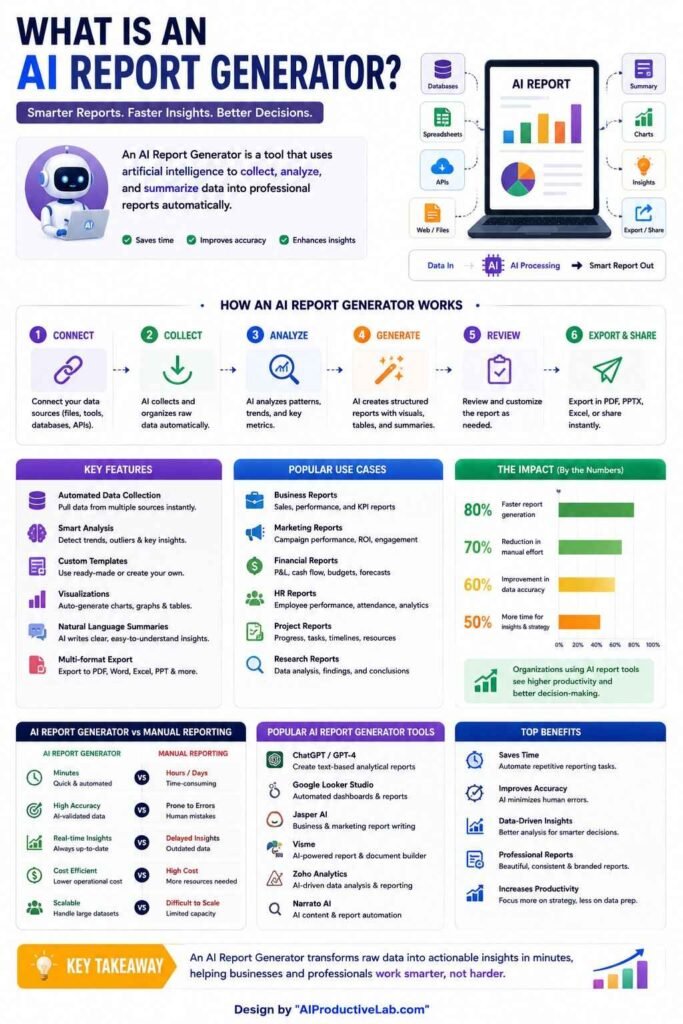
An AI report generator is software that builds structured reports from raw inputs. Those inputs might be spreadsheets, PDFs, meeting transcripts, ad platform data, or website analytics. Instead of assembling everything manually, you connect your sources and the tool handles structure, language, and formatting.
The better AI reporting tools go beyond formatting. They summarize findings, surface key insights, flag risks, and explain why numbers moved. That “so what” layer is what separates a useful report from a pile of charts.
How to Evaluate AI Reporting Tools
Before comparing products, get clear on what actually matters for your workflow.
- Data connections: Does it connect natively to your sources, or will someone export CSVs every week?
- Evidence and traceability: Can you trace a claim back to the underlying data? This is critical for board packs and client work.
- Executive summary quality: Does the tool produce something leadership can act on, or just a description of the charts?
- Export and branding: Can you push output to PDF, PowerPoint, or a white-labelled client portal?
- Governance: Who can see what? Does it respect existing permissions?
- Pricing model: Per-seat pricing scales fast. A 50-person deployment can cost thousands per month before you add data platform costs.
15 Best AI Report Generators in 2026
1. Microsoft 365 Copilot
Copilot works inside Word, Excel, and PowerPoint, so reports never leave your existing files. It drafts summaries from SharePoint documents and turns spreadsheet data into narrative. Best for organizations already standardized on Microsoft. The catch: output is less structured than purpose-built report builders, and quality depends heavily on clean source documents.
2. ChatGPT (Advanced Data Analysis)
ChatGPT remains the most flexible option available. Upload a spreadsheet and it will clean, analyze, chart, and write about it. It handles almost any report type, from competitive analysis to financial summaries. The trade-off is that you supply the structure. Vague prompts produce vague reports, so define your section list first.
3. Claude
Claude is strong on long documents. It handles very large context windows, so it can read hundreds of pages of source material in one pass and produce a coherent synthesis. That makes it excellent for research reports, policy summaries, and document-heavy analysis. Native charting is weaker than dedicated data tools, so pair it with a visualization layer.
4. Julius AI
Julius AI is built for people who need data science depth without writing code. Upload a file or connect a warehouse, then ask questions in plain English. It runs the analysis, builds charts, and exports to slides or Excel. Pricing sits in the $35 to $45 per month range, making it one of the fastest entry points for individuals and small teams.
5. Power BI Copilot
If your data already lives in the Microsoft stack, Power BI Copilot is the obvious pick. It answers natural language questions against governed datasets and generates report pages automatically. Be careful with cost. Per-seat licensing scales linearly, and a 50-person deployment can run well over $2,000 per month before premium capacity charges.
6. Tableau Pulse
Tableau Pulse layers AI-generated insight summaries on top of existing Tableau dashboards. It monitors metrics, detects changes, and explains them in plain language. For Tableau Cloud customers it ships inside the existing subscription, so there is no extra AI line item. Best for visualization-heavy organizations that already have a mature Tableau deployment.
7. ThoughtSpot Spotter
ThoughtSpot’s search-driven model lets anyone query live data without an analyst in the middle. Spotter, its AI analyst, returns interactive visualizations plus written explanations. Plans typically start around $25 per user per month, with enterprise pricing on request. Note that lower tiers cap AI queries per user, so check limits before rolling it out widely.
8. Databox
Databox has grown from a KPI dashboard into a genuine AI report generator. Its Genie AI analyst writes performance summaries, detects anomalies, and produces forecasts. There is a usable free tier, with paid plans running roughly $159 to $799 per month. Flat-fee pricing means cost stays stable whether 10 or 100 people use it.
9. Whatagraph
Whatagraph is built for marketing agencies that need polished, client-ready reports. It connects to 55+ marketing platforms, blends metrics across channels, and layers AI insights on top. Report design quality is its main advantage. Data refreshes every 30 minutes and white-labelling is included on paid plans, which start around $229 per month.
10. AgencyAnalytics
AgencyAnalytics is purpose-built for one workflow: agencies reporting to many clients. It includes rank tracking, site audits, and backlink monitoring, plus branded client portals where each client sees only their own dashboards. Pricing runs roughly $59 to $349 per month by client count. Agencies running complex cross-channel campaigns may eventually outgrow it.
11. Domo
Domo is a cloud business intelligence platform with heavy customization. It pulls from many sources into live dashboards and supports custom visualizations and data apps. Its AI layer adds natural language querying and automated narratives. Best for enterprises that need one platform for everything. Expect a longer implementation, typically several weeks to a few months.
12. Improvado
Improvado sits at the enterprise end of marketing reporting. It handles data extraction, transformation, and governance before the AI layer even starts writing. That makes it a strong fit when data quality is the bottleneck. Costs are significant, often several thousand dollars per month once implementation and maintenance are included.
13. Supermetrics AI
Supermetrics is the connector layer many teams already use to move marketing data into Looker Studio, Sheets, or a warehouse. Its AI features add automated summaries and insight generation on top of those pipelines. Best for teams already invested in the Google ecosystem who want AI reporting without replacing their existing setup.
14. Zoho Analytics with Zia
Zoho Analytics offers self-service BI with a built-in AI assistant called Zia. Ask questions in natural language and get charts and summaries back. It delivers strong value for small and mid-sized businesses, especially those already using other Zoho products. The interface feels more dated than newer competitors, but the price-to-capability ratio is hard to beat.
15. Gamma
Gamma is the pick when the deliverable is a presentation rather than a document. Feed it your findings and it produces a designed deck with consistent layout and visuals. It will not analyze a raw dataset for you, so it works best as the final step after another tool handles the numbers.
AI Report Generator Comparison Table
| Tool | Best For | Starting Price |
|---|---|---|
| Microsoft 365 Copilot | Microsoft-based teams | Per-user, plan dependent |
| ChatGPT | Flexible one-off analysis | ~$20/user/month |
| Claude | Long document synthesis | ~$20/user/month |
| Julius AI | Non-technical data analysis | ~$35/month |
| Power BI Copilot | Governed Microsoft data | Per-seat licensing |
| Tableau Pulse | Existing Tableau users | Included in Tableau Cloud |
| ThoughtSpot Spotter | Search-driven enterprise BI | ~$25/user/month |
| Databox | Self-serve BI with AI analyst | Free; paid from ~$159/mo |
| Whatagraph | Agency client reporting | ~$229/month |
| AgencyAnalytics | SEO and PPC agencies | ~$59/month |
| Domo | Enterprise-scale dashboards | Custom |
| Improvado | Enterprise data pipelines | $500+/month |
| Supermetrics AI | Looker Studio and Sheets teams | Tiered subscription |
| Zoho Analytics (Zia) | SMB value pick | Low-cost tiers |
| Gamma | Presentation-style reports | Free tier available |
Prices change frequently. Always confirm on the vendor’s live pricing page.
How to Choose the Right AI Report Generator
Match the tool to your bottleneck, not to the longest feature list.
- Your data is messy or in spreadsheets: Start with Julius AI, ChatGPT, or Zoho Analytics.
- Your data is already in a warehouse: Look at ThoughtSpot, Power BI Copilot, or Tableau Pulse.
- You report to external clients: Whatagraph or AgencyAnalytics will save the most time.
- You need long written analysis: Claude or Microsoft 365 Copilot handle document-heavy work well.
- You need board-ready visuals: Pair a data tool with Gamma for the final deck.
One more tip: AI reporting works best on stable data. If your tracking has gaps or your schema changes often, fix data quality first. No AI report generator can rescue unreliable inputs.
Common Mistakes to Avoid
Most disappointing AI-generated reports fail for the same few reasons.
- Treating the tool like a one-shot chatbot instead of a drafting system.
- Skipping the section outline and asking for a full report in one vague prompt.
- Accepting confident-sounding claims without checking the source data.
- Publishing without human review, which is where credibility is usually lost.
Final Thoughts
There is no single best AI report generator for every team. The right choice depends on where your data lives, who reads the report, and how much governance you need. Shortlist two or three tools, run them on a real report you produced last month, and compare the output honestly. The tool that removes your biggest friction point wins, regardless of how it ranks on anyone else’s list.
FAQs
It depends on your use case. Databox and Julius AI suit smaller teams, while ThoughtSpot and Domo fit enterprises.
Yes. Databox, Looker Studio, and Gamma all offer free tiers with limited data sources and features.
Yes. Tools like Julius AI and ChatGPT clean, analyze, and chart uploaded spreadsheets automatically.
Entry plans start near $25 to $50 per month. Enterprise platforms often exceed $500 to $2,000 monthly.
They are only as reliable as your data. Always verify key figures and review the narrative before sharing.




 AI/ML Strategy and Consulting
 Data Science And Data Analytics
 Generative AI
 AI Consulting Services
 AI Automation Solutions
 API Integration